发行说明
版本 1.63
🌐 Version 1.63
🪟 在帧之间定位
🌐 🪟 Locate across frames
page.frame_locator() 和 frame.frame_locator() 在没有选择器的情况下调用,会在子树的任何框架中进行搜索,所以你不再需要先定位 iframe:
# Finds the button in any frame on the page.
page.frame_locator().get_by_role("button").click()
其余的定位器在单个框架内解析,就像普通定位器一样,如果它匹配了多个框架中的元素,就会抛出错误。
🌐 The rest of the locator resolves inside a single frame, just like a regular locator, and an error is thrown when it matches elements in several frames.
👁️ 仅可见定位器
🌐 👁️ Visible-only locators
新的 locator.visible 会返回一个只匹配可见元素的定位器。它是推荐替代 :visible CSS 伪类的方式:
🌐 New locator.visible returns a locator that matches only visible elements. It is the recommended replacement for the :visible CSS pseudo-class:
page.locator("button").visible.click()
🖼️ Aria 和屏幕截图痕迹
🌐 🖼️ Aria and screen snapshots in traces
tracing.start() 的新选项 aria_snapshots 和 screen_snapshots 会在每个操作时捕获 aria 快照和页面截图:
🌐 New aria_snapshots and screen_snapshots options of tracing.start() capture an aria snapshot and a screenshot of the page on every action:
context.tracing.start(snapshots=True, aria_snapshots=True, screen_snapshots=True)
在记录了 aria 和屏幕快照后,追踪查看器中的新 Display Aria 模式会将操作截图与 aria 快照并排显示,鼠标悬停在 aria 节点上时,会在截图上高亮显示它。
🌐 With aria and screen snapshots recorded, the new Display Aria mode in the trace viewer shows the action screenshot side by side with the aria snapshot, and hovering an aria node highlights it on the screenshot.
新 API
🌐 New APIs
浏览器和环境
🌐 Browser and Context
- http_credentials 现在也支持凭证数组。第一个与请求来源匹配的条目会被使用,而没有来源的条目会匹配任何请求。
- 新选项 opfs 在存储状态中包含了 原生私有文件系统,因此它可以被保留并在后续的上下文中恢复。
- 当用户接受、拒绝或关闭 JavaScript 对话框时,会触发新的事件 page.on("dialogclosed") 和 browser_context.on("dialogclosed")。
命令行
🌐 Command line
playwright install --no-remove会保留其他 Playwright 安装的浏览器,而不是将它们删除。playwright codegen --http-credentials会记录受 HTTP 身份验证保护的页面情况。
公告
🌐 Announcements
- ⚠️ Ubuntu 20.04 已经不再受支持。
- 🐧 在 Linux arm64 上,Playwright 现在会下载 Chromium 的 测试用 Chrome 版本,这和其他平台使用的是同一个版本。
浏览器版本
🌐 Browser Versions
- Chromium 153.0.8010.12
- Mozilla Firefox 155.0
- WebKit 26.6
该版本还针对以下稳定渠道进行了测试:
🌐 This version was also tested against the following stable channels:
- 谷歌浏览器 153
- 微软 Edge 153
版本 1.62
🌐 Version 1.62
🖼️ WebP 截图
🌐 🖼️ WebP screenshots
page.screenshot() 和 locator.screenshot() 现在可以以 WebP 格式捕捉截图 —— Playwright 会根据 .webp 文件扩展名推断格式,或者你也可以显式设置 type。质量 100(默认)是无损的,而较低的值则使用有损压缩:
page.screenshot(path="homepage.webp", quality=50)
新 API
🌐 New APIs
- 动作上新增了
scroll选项("auto"|"none"),用于选择退出 Playwright 的自动滚动到可见。 - 新的 locator.wait_for_function() 会一直等待,直到用匹配的元素调用的函数返回一个真值。
- 新的 api_response.timing 会返回一个 API 响应的资源计时信息。
公告
🌐 Announcements
- 📋 在无头模式下,剪贴板现在与操作系统隔离,所以使用
navigator.clipboard的测试不再读取或覆盖运行它们的机器的剪贴板。 - ⚠️ Debian 11 不再受支持。
浏览器版本
🌐 Browser Versions
- Chromium 151.0.7922.34
- Mozilla Firefox 153.0
- WebKit 26.5
该版本还针对以下稳定渠道进行了测试:
🌐 This version was also tested against the following stable channels:
- 谷歌浏览器 151
- 微软 Edge 151
版本 1.61
🌐 Version 1.61
🔑 WebAuthn 密钥
🌐 🔑 WebAuthn passkeys
新的 Credentials 虚拟认证器,可通过 browser_context.credentials 使用,允许测试在页面中注册通行密钥并应答 navigator.credentials.create() / navigator.credentials.get() 仪式 — 不需要真实的硬件密钥,适用于所有浏览器:
🌐 New Credentials virtual authenticator, available via browser_context.credentials, lets tests register passkeys and answer navigator.credentials.create() / navigator.credentials.get() ceremonies in the page — no real hardware key required, works in all browsers:
context = browser.new_context()

# Seed a passkey your backend provisioned for a test user.
context.credentials.create("example.com",
    id=credential_id,
    user_handle=user_handle,
    private_key=private_key,
    public_key=public_key,
)
context.credentials.install()

page = context.new_page()
page.goto("https://example.com/login")
# The page's navigator.credentials.get() is answered with the seeded passkey.
你也可以让应用在一次设置测试中注册一个通行密钥,然后使用 credentials.get() 读取它,并将其用于后续测试 — 详情请参阅 Credentials。
🌐 You can also let the app register a passkey once in a setup test, read it back with credentials.get(), and seed it into later tests — see Credentials for details.
🗃️ 网页存储
🌐 🗃️ Web Storage
新的 WebStorage API,可通过 page.local_storage 和 page.session_storage 使用,用于读取和写入当前来源的页面存储:
🌐 New WebStorage API, available via page.local_storage and page.session_storage, reads and writes the page's storage for the current origin:
page.local_storage.set_item("token", "abc")
token = page.local_storage.get_item("token")
items = page.session_storage.items()
新 API
🌐 New APIs
- api_response.security_details() and api_response.server_addr() mirror the browser-side response.security_details() and response.server_addr().
- browser_type.connect_over_cdp() 中的新选项
artifacts_dir控制在附加到现有浏览器时,诸如跟踪和下载的工件存储位置。 - screencast.show_actions() 中的新选项
cursor控制为指针操作渲染的光标装饰。 - screencast.start() 中的
on_frame回调现在会接收一个timestamp,表示浏览器呈现该帧的时间。
🛠️ 其他改进
🌐 🛠️ Other improvements
- Playwright 现在支持 Ubuntu 26.04。
- HAR 和跟踪记录现在包括 WebSocket 请求。
浏览器版本
🌐 Browser Versions
- Chromium 149.0.7827.55
- Mozilla Firefox 151.0
- WebKit 26.5
该版本还针对以下稳定渠道进行了测试:
🌐 This version was also tested against the following stable channels:
- 谷歌浏览器149
- 微软 Edge 149
版本 1.60
🌐 Version 1.60
🌐 HAR 追踪记录
🌐 🌐 HAR recording on Tracing
tracing.start_har() / tracing.stop_har() 将 HAR 记录作为一等追踪 API 暴露出来,具有与 record_har 相同的 content、mode 和 url_filter 选项:
context.tracing.start_har("trace.har")
page = context.new_page()
page.goto("https://playwright.nodejs.cn")
context.tracing.stop_har()
🪝 放置 API
🌐 🪝 Drop API
新的 locator.drop() 模拟将文件或类似剪贴板的数据拖放到元素上。Playwright 会在页面上下文中使用合成 [DataTransfer] 派发 dragenter、dragover 和 drop —— 跨浏览器有效,非常适合测试上传区域:
🌐 New locator.drop() simulates an external drag-and-drop of files or clipboard-like data onto an element. Playwright dispatches dragenter, dragover, and drop with a synthetic [DataTransfer] in the page context — works cross-browser and is great for testing upload zones:
page.locator("#dropzone").drop(
    files={"name": "note.txt", "mime_type": "text/plain", "buffer": b"hello"},
)

page.locator("#dropzone").drop(
    data={
        "text/plain": "hello world",
        "text/uri-list": "https://example.com",
    },
)
🎯 Aria 快照
🌐 🎯 Aria snapshots
- expect(page).to_match_aria_snapshot() 现在可以在 Page 上使用,除了在 Locator 上 —— 相当于对
page.locator("body")进行断言。 - locator.aria_snapshot() / page.aria_snapshot() 上新的
boxes选项会将每个元素的边界框附加为[box=x,y,width,height],对 AI 使用非常有用。
新 API
🌐 New APIs
浏览器、上下文和页面
🌐 Browser, Context and Page
- 事件 browser.on("context") — 当浏览器上创建新上下文时触发。
- BrowserContext now mirrors lifecycle events from its pages: browser_context.on("download"), browser_context.on("frameattached"), browser_context.on("framedetached"), browser_context.on("framenavigated"), browser_context.on("pageclose"), browser_context.on("pageload").
定位器和断言
🌐 Locators and Assertions
- page.get_by_role() / locator.get_by_role() / frame.get_by_role() / frame_locator.get_by_role() 中的新选项
description用于匹配 可访问描述。 - expect(locator).to_have_css() 中的新选项
pseudo从::before或::after读取计算样式。 - 在 locator.highlight() 中新增选项
style,可对高亮覆盖层应用额外的内联 CSS,同时新增 page.hide_highlight() 用于清除所有高亮。
网络
🌐 Network
- web_socket_route.protocols 返回页面请求的 WebSocket 子协议。
- browser_type.connect_over_cdp() 中的新选项
no_defaults会禁用 Playwright 对默认上下文的默认覆盖(下载行为、焦点模拟、媒体模拟),因此附加到用户的日常使用浏览器不会干扰其状态。
错误
🌐 Errors
- 新的 web_error.location 镜像了 console_message.location。
- console_message.location now exposes
line/columnproperties (line_number/column_numberare deprecated).
🛠️ 其他改进
🌐 🛠️ Other improvements
- Trace Viewer 在网络详细信息面板中为 JSON / 表单请求和响应体添加了格式化显示的切换功能。
重大更改 ⚠️
🌐 Breaking Changes ⚠️
- 移除了
BrowserContext.expose_binding和Page.expose_binding上已长期弃用的handle选项。
浏览器版本
🌐 Browser Versions
- Chromium 148.0.7778.96
- Mozilla Firefox 150.0.2
- WebKit 26.4
该版本还针对以下稳定渠道进行了测试:
🌐 This version was also tested against the following stable channels:
- 谷歌浏览器 147
- 微软 Edge 147
版本 1.59
🌐 Version 1.59
🎬 屏幕录制
🌐 🎬 Screencast
新的 page.screencast API 提供了一个统一的接口来捕获页面内容,功能包括:
🌐 New page.screencast API provides a unified interface for capturing page content with:
- 屏幕录制
- 动作注释
- 视觉叠加
- 实时帧捕获
- 代理视频收据

屏幕录制 — 使用精确的开始/停止控制录制视频,作为 record_video_dir 选项的替代:
page.screencast.start(path="video.webm")
# ... perform actions ...
page.screencast.stop()
操作注释 — 启用内置的可视化注释,在录制过程中高亮交互元素并显示操作标题:
page.screencast.show_actions(position="top-right")
screencast.show_actions() 接受 position('top-left'、'top'、'top-right'、'bottom-left'、'bottom'、'bottom-right')、duration(每个注释的毫秒数)和 font_size(像素)。返回一个可释放对象以停止显示操作。
视觉覆盖 — 在页面上添加章节标题和自定义 HTML 覆盖层,以实现更丰富的叙述:
page.screencast.show_chapter("Adding TODOs",
    description="Type and press enter for each TODO",
    duration=1000,
)

page.screencast.show_overlay('<div style="color: red">Recording</div>')
实时帧捕获 — 流式传输 JPEG 编码的帧,用于自定义处理,例如缩略图、实时预览、人工智能视觉等:
page.screencast.start(
    on_frame=lambda frame: send_to_vision_model(frame["data"]),
)
能动视频记录 —— 编码代理可以生成其工作的公开视频证据。完成任务后,代理可以录制带有丰富注释的演示视频供人工审核:
page.screencast.start(path="receipt.webm")
page.screencast.show_actions(position="top-right")

page.screencast.show_chapter("Verifying checkout flow",
    description="Added coupon code support per ticket #1234",
)

# Agent performs the verification steps...
page.locator("#coupon").fill("SAVE20")
page.locator("#apply-coupon").click()
expect(page.locator(".discount")).to_contain_text("20%")

page.screencast.show_chapter("Done",
    description="Coupon applied, discount reflected in total",
)

page.screencast.stop()
生成的视频作为收据:章节标题提供上下文,操作注释突出每个交互,视觉演练比文本日志更快查看。
🌐 The resulting video serves as a receipt: chapter titles provide context, action annotations highlight each interaction, and the visual walkthrough is faster to review than text logs.
🔍 快照和定位器
🌐 🔍 Snapshots and Locators
- 方法 page.aria_snapshot() 用于捕获页面的 aria 快照——等同于
page.locator('body').aria_snapshot()。 - locator.aria_snapshot() 中的选项
depth和mode。 - 方法 locator.normalize() 将定位器转换为遵循最佳实践的形式,例如测试 ID 和 ARIA 角色。
- 方法 page.pick_locator() 进入交互模式,悬停在元素上会高亮显示它们并显示相应的定位符。点击元素以获取其 Locator。使用 page.cancel_pick_locator() 可以取消。
新 API
🌐 New APIs
Screencast
- page.screencast 提供视频录制、实时帧流以及叠加管理。
- 用于录制和帧捕获的方法 screencast.start() 和 screencast.stop()。
- 用于操作注释的方法 screencast.show_actions() 和 screencast.hide_actions()。
- 用于可视化叠加的 screencast.show_chapter() 和 screencast.show_overlay() 方法。
- 用于覆盖可见性控制的方法 screencast.show_overlays() 和 screencast.hide_overlays()。
存储、控制台和错误
🌐 Storage, Console and Errors
- 方法 browser_context.set_storage_state() 会清除所有来源的现有 cookies、本地存储和 IndexedDB,并设置新的存储状态——无需创建新的上下文。
- 方法 page.clear_console_messages() 和 page.clear_page_errors() 用于清除存储的消息和错误。
- page.console_messages() 和 page.page_errors() 中的选项
filter控制返回哪些消息。 - 方法 console_message.timestamp。
杂项
🌐 Miscellaneous
- browser_context.debugger 提供对 Playwright 调试器的编程控制。
- 方法 browser_context.is_closed()。
- 方法 request.existing_response 返回响应而无需等待。
- 方法 response.http_version() 返回响应使用的 HTTP 版本。
- tracing.start() 中用于实时跟踪更新的选项
live。 [browser_type.launch()](/api/class-browsertype.mdx#browser-type-launch)中的选项artifacts_dir用于配置工件目录。
🔗 互操作性
🌐 🔗 Interoperability
新的 browser.bind() API 使已启动的浏览器可供 playwright-cli、@playwright/mcp 及其他客户端连接。
🌐 New browser.bind() API makes a launched browser available for playwright-cli, @playwright/mcp, and other clients to connect to.
绑定浏览器 — 启动浏览器并绑定它,以便其他人可以连接:
server_info = await browser.bind("my-session",
    workspace_dir="/my/project",
)
从 playwright-cli 连接 — 从你喜欢的编码工具连接到正在运行的浏览器。
playwright-cli attach my-session
playwright-cli -s my-session snapshot
从 @playwright/mcp 连接 — 或将你的 MCP 服务器指向正在运行的浏览器。
@playwright/mcp --endpoint=my-session
从 Playwright 客户端连接 — 使用 API 连接到浏览器。支持同时多个客户端!
browser = await chromium.connect(server_info["endpoint"])
传递 host 和 port 选项以通过 WebSocket 绑定,而不是命名管道:
🌐 Pass host and port options to bind over WebSocket instead of a named pipe:
server_info = await browser.bind("my-session",
    host="localhost",
    port=0,
)
# server_info["endpoint"] is a ws:// URL
调用 browser.unbind() 来停止接受新的连接。
🌐 Call browser.unbind() to stop accepting new connections.
📊 可观测性
🌐 📊 Observability
运行 playwright-cli show 打开仪表板,该仪表板列出所有已绑定的浏览器及其状态,并允许与它们进行交互:
🌐 Run playwright-cli show to open the Dashboard that lists all the bound browsers, their statuses, and allows interacting with them:
- 查看你的代理在后台浏览器中正在做什么
- 点击进入会话进行手动干预
- 打开开发者工具以检查来自后台浏览器的页面。
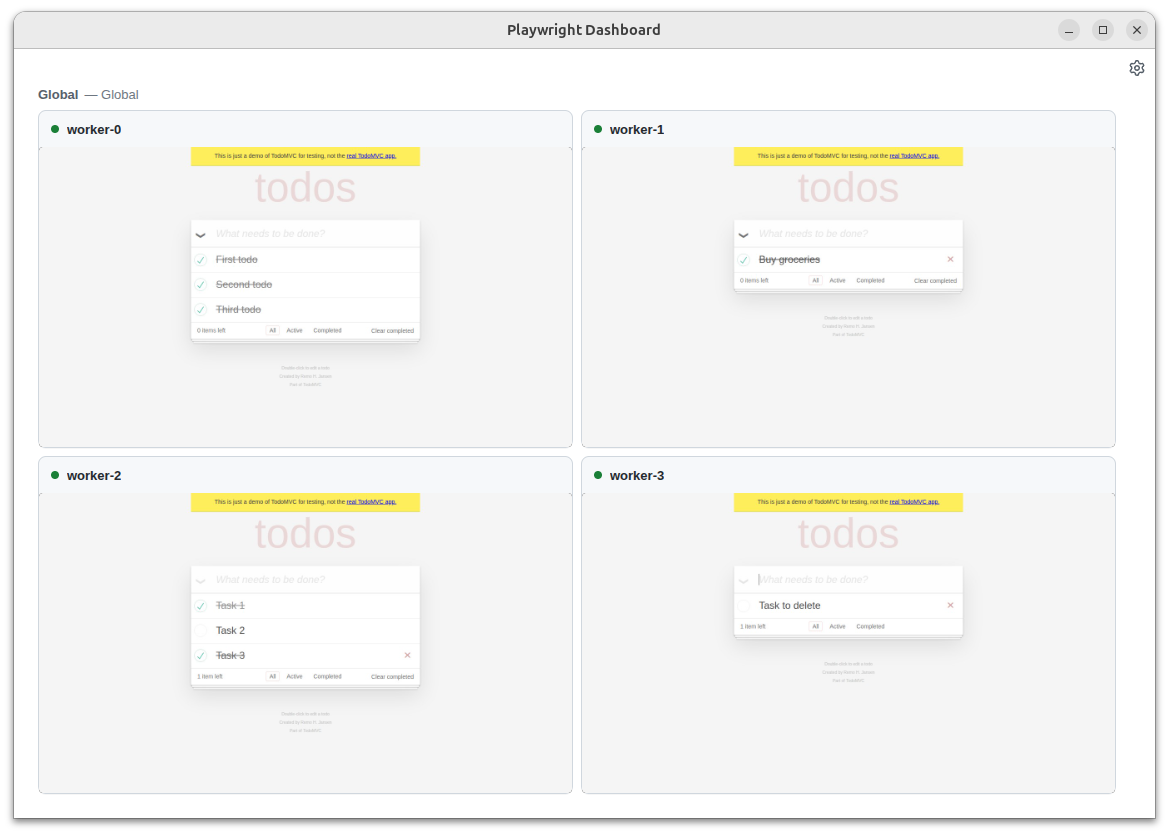
playwright-cli会自动绑定它的所有浏览器,因此你可以看到你的代理在做什么。- 传递
PLAYWRIGHT_DASHBOARD=1环境变量以在仪表板中查看所有@playwright/test浏览器。
重大更改 ⚠️
🌐 Breaking Changes ⚠️
- 已移除对 macOS 14 的 WebKit 支持。我们建议升级你的 macOS 版本,或保持使用旧版 Playwright。
浏览器版本
🌐 Browser Versions
- Chromium 147.0.7727.15
- Mozilla Firefox 148.0.2
- WebKit 26.4
该版本还针对以下稳定渠道进行了测试:
🌐 This version was also tested against the following stable channels:
- 谷歌浏览器 146
- 微软 Edge 146
1.58 版本
🌐 Version 1.58
用户界面模式和跟踪查看器改进
🌐 UI Mode and Trace Viewer Improvements
- 新的“系统”主题选项会跟随你的操作系统深色/浅色模式偏好
- 代码编辑器现在可以使用搜索功能(Cmd/Ctrl+F)
- 网络详细信息面板已重新组织,以提高可用性
- JSON 响应现在会自动格式化以提高可读性
感谢 @cpAdm 对这些改进的贡献!
🌐 Thanks to @cpAdm for contributing these improvements!
杂项
🌐 Miscellaneous
browser_type.connect_over_cdp() 现在接受 is_local 选项。 当设置为 True 时,它告诉 Playwright 它与 CDP 服务器运行在同一主机上,从而启用文件系统优化。
重大更改 ⚠️
🌐 Breaking Changes ⚠️
- 已移除
_react和_vue选择器。有关替代方案,请参阅 定位器指南。 - 已移除
:light选择器引擎后缀。请改用标准 CSS 选择器。 - 来自 browser_type.launch() 的选项
devtools已被移除。请改用args=['--auto-open-devtools-for-tabs']。 - 已移除对 macOS 13 的 WebKit 支持。我们建议升级你的 macOS 版本,或继续使用较旧的 Playwright 版本。
浏览器版本
🌐 Browser Versions
- Chromium 145.0.7632.6
- Mozilla Firefox 146.0.1
- WebKit 26.0
该版本还针对以下稳定渠道进行了测试:
🌐 This version was also tested against the following stable channels:
- 谷歌浏览器 144
- 微软 Edge 144
1.57 版本
🌐 Version 1.57
用于测试的 Chrome
🌐 Chrome for Testing
Playwright 现在运行在 Chrome for Testing 构建版本上,而不是 Chromium。带界面模式使用 chrome;无界面模式使用 chrome-headless-shell。升级到 v1.57 后,现有测试应继续通过。
🌐 Playwright now runs on Chrome for Testing builds rather than Chromium. Headed mode uses chrome; headless mode uses chrome-headless-shell. Existing tests should continue to pass after upgrading to v1.57.
我们预计此次切换不会带来功能上的变化。最大变化是工具栏中的新图标和标题。
🌐 We're expecting no functional changes to come from this switch. The biggest change is the new icon and title in your toolbar.

如果你仍然看到意外的行为变化,请 提交问题。
🌐 If you still see an unexpected behaviour change, please file an issue.
在 Arm64 Linux 上,Playwright 仍然使用 Chromium。
🌐 On Arm64 Linux, Playwright continues to use Chromium.
重大变更
🌐 Breaking Change
在被弃用三年后,我们已从 API 中移除了 page.accessibility。如果你需要测试页面的可访问性,请使用其他库,例如 Axe。有关与 Axe 集成的详细信息,请参阅我们的 Node.js 指南。
🌐 After 3 years of being deprecated, we removed page.accessibility from our API. Please use other libraries such as Axe if you need to test page accessibility. See our Node.js guide for integration with Axe.
新 API
🌐 New APIs
- 当 worker 内的 JavaScript 调用 console API 方法(例如 console.log 或 console.dir)时,会触发 worker.on("console") 事件。可以使用 worker.expect_event() 来等待该事件。
- locator.description returns locator description previously set with locator.describe().
- 在 locator.click() 和 locator.drag_to() 中新增选项 steps,用于配置在将鼠标指针移动到目标元素时触发的
mousemove事件数量。 - 由 Service Workers 发出的网络请求现在可以被报告,并且可以通过 BrowserContext 路由,仅在 Chromium 中可用。你可以使用
PLAYWRIGHT_DISABLE_SERVICE_WORKER_NETWORK环境变量选择退出。 - 来自服务工作进程的控制台消息通过 worker.on("console") 分发。你可以使用
PLAYWRIGHT_DISABLE_SERVICE_WORKER_CONSOLE环境变量选择退出此功能。
浏览器版本
🌐 Browser Versions
- Chromium 143.0.7499.4
- Mozilla Firefox 144.0.2
- WebKit 26.0
1.56 版本
🌐 Version 1.56
新 API
🌐 New APIs
- 用于从页面检索最新控制台消息的新方法 page.console_messages() 和 page.page_errors()
- 新方法 page.requests() 用于获取页面的最新网络请求
重大变化
🌐 Breaking Changes
- 事件 browser_context.on("backgroundpage") 已被弃用,将不会被触发。方法 browser_context.background_pages 将返回一个空列表
杂项
🌐 Miscellaneous
- Aria 快照渲染并比较
inputplaceholder
浏览器版本
🌐 Browser Versions
- Chromium 141.0.7390.37
- Mozilla Firefox 142.0.1
- WebKit 26.0
1.55 版本
🌐 Version 1.55
代码生成器
🌐 Codegen
- 自动
to_be_visible()断言:Codegen 现在可以为常见的 UI 交互生成自动to_be_visible()断言。此功能可以在 Codegen 设置界面中启用。
重大变化
🌐 Breaking Changes
- ⚠️ 已停止支持 Chromium 扩展清单 v2。
杂项
🌐 Miscellaneous
- 已新增对 Debian 13 “Trixie”的支持。
浏览器版本
🌐 Browser Versions
- Chromium 140.0.7339.16
- Mozilla Firefox 141.0
- WebKit 26.0
该版本还针对以下稳定渠道进行了测试:
🌐 This version was also tested against the following stable channels:
- Google Chrome 139
- Microsoft Edge 139
1.54 版本
🌐 Version 1.54
高亮
🌐 Highlights
-
在 browser_context.cookies() 和 browser_context.add_cookies() 中新增 cookie 属性
partition_key。此属性允许保存和恢复分区 cookie。更多信息请参阅 CHIPS MDN 文章。请注意,不同浏览器对 cookie 分区的支持和默认设置不同。 -
多个命令中新增选项
--user-data-dir。你可以指定相同的用户数据目录,以便在会话之间重用浏览状态,例如身份验证信息。playwright codegen --user-data-dir=./user-data -
playwright open不再打开测试录制器。请改用playwright codegen。
浏览器版本
🌐 Browser Versions
- Chromium 139.0.7258.5
- Mozilla Firefox 140.0.2
- WebKit 26.0
该版本还针对以下稳定渠道进行了测试:
🌐 This version was also tested against the following stable channels:
- Google Chrome 140
- Microsoft Edge 140
1.53 版本
🌐 Version 1.53
Trace 查看器和 HTML 报告器更新
🌐 Trace Viewer and HTML Reporter Updates
-
Trace Viewer的新步骤:
-
新方法 locator.describe() 用于描述定位器。用于跟踪查看器。
button = page.get_by_test_id("btn-sub").describe("Subscribe button")button.click() -
python -m playwright install --list现在将列出所有已安装的浏览器、版本和位置。
浏览器版本
🌐 Browser Versions
- Chromium 138.0.7204.4
- Mozilla Firefox 139.0
- WebKit 18.5
该版本还针对以下稳定渠道进行了测试:
🌐 This version was also tested against the following stable channels:
- Google Chrome 137
- Microsoft Edge 137
1.52 版本
🌐 Version 1.52
高亮
🌐 Highlights
-
新方法 expect(locator).to_contain_class() 用于符合人机工程学地断言元素上的单个类名。
expect(page.get_by_role('listitem', name='Ship v1.52')).to_contain_class('done') -
Aria Snapshots 获得了两个新属性:
/children用于严格匹配,/url用于链接。expect(locator).to_match_aria_snapshot("""- list- /children: equal- listitem: Feature A- listitem:- link "Feature B":- /url: "https://playwright.nodejs.cn"""")
杂项
🌐 Miscellaneous
- 在 api_request.new_context() 中新增选项 max_redirects 用于控制最大重定向次数。
重大变化
🌐 Breaking Changes
- 像 page.route() 这样的方法中的通配符 URL 模式不再支持
?和[]。我们建议改用正则表达式。 - 方法 route.continue_() 不再允许覆盖
Cookie头。如果提供了Cookie头,它将被忽略,Cookie 将从浏览器的 Cookie 存储中加载。要设置自定义 Cookie,请使用 browser_context.add_cookies()。 - macOS 13 已被弃用,将不再接收 WebKit 更新。请升级到更新的 macOS 版本,以继续享受最新的 WebKit 改进。
浏览器版本
🌐 Browser Versions
- Chromium 136.0.7103.25
- Mozilla Firefox 137.0
- WebKit 18.4
该版本还针对以下稳定渠道进行了测试:
🌐 This version was also tested against the following stable channels:
- Google Chrome 135
- Microsoft Edge 135
1.51 版本
🌐 Version 1.51
高亮
🌐 Highlights
-
新的选项 indexed_db 用于 browser_context.storage_state(),可以保存和恢复 IndexedDB 的内容。当你的应用使用 IndexedDB API 存储身份验证令牌(例如 Firebase 身份验证)时,这非常有用。
这里有一个按照认证指南的示例:
# Save storage state into the file. Make sure to include IndexedDB.storage = await context.storage_state(path="state.json", indexed_db=True)# Create a new context with the saved storage state.context = await browser.new_context(storage_state="state.json") -
新的选项 visible 用于 locator.filter(),允许仅匹配可见元素。
# Ignore invisible todo items.todo_items = page.get_by_test_id("todo-item").filter(visible=True)# Check there are exactly 3 visible ones.await expect(todo_items).to_have_count(3) -
方法 page.emulate_media() 和 browser.new_context() 的新选项
contrast允许模拟prefers-contrast媒体特性。 -
新的选项 fail_on_status_code 会使通过 APIRequestContext 发出的所有 fetch 请求在响应代码不是 2xx 或 3xx 时抛出异常。
浏览器版本
🌐 Browser Versions
- Chromium 134.0.6998.35
- Mozilla Firefox 135.0
- WebKit 18.4
该版本还针对以下稳定渠道进行了测试:
🌐 This version was also tested against the following stable channels:
- Google Chrome 133
- Microsoft Edge 133
1.50 版本
🌐 Version 1.50
异步 Pytest 插件
🌐 Async Pytest Plugin
- Playwright 的 Pytest 插件 现在支持 异步夹具。
杂项
🌐 Miscellaneous
- 添加了方法 expect(locator).to_have_accessible_error_message() 用于断言 Locator 指向具有指定 aria errormessage 的元素。
UI 更新
🌐 UI updates
- Codegen 中的新按钮用于选择元素以生成 aria 快照。
- 其他详细信息(例如按下的键)现在与跟踪中的操作 API 调用一起显示。
- 在跟踪中显示
canvas内容容易出错。默认情况下已禁用显示,可以通过Display canvas content用户界面设置启用。 Call和Network面板现在显示额外的时间信息。
重点
🌐 Breaking
- expect(locator).to_be_editable() 和 locator.is_editable() 现在如果目标元素不是
<input>、<select>或其他可编辑的元素,将会抛出异常。
浏览器版本
🌐 Browser Versions
- Chromium 133.0.6943.16
- Mozilla Firefox 134.0
- WebKit 18.2
该版本还针对以下稳定渠道进行了测试:
🌐 This version was also tested against the following stable channels:
- Google Chrome 132
- Microsoft Edge 132
1.49 版本
🌐 Version 1.49
Aria 快照
🌐 Aria snapshots
新的断言 expect(locator).to_match_aria_snapshot() 通过与预期的无障碍树(以 YAML 表示)比较来验证页面结构。
🌐 New assertion expect(locator).to_match_aria_snapshot() verifies page structure by comparing to an expected accessibility tree, represented as YAML.
page.goto("https://playwright.nodejs.cn")
expect(page.locator('body')).to_match_aria_snapshot('''
  - banner:
    - heading /Playwright enables reliable/ [level=1]
    - link "Get started"
    - link "Star microsoft/playwright on GitHub"
  - main:
    - img "Browsers (Chromium, Firefox, WebKit)"
    - heading "Any browser • Any platform • One API"
''')
你可以使用 Test Generator 生成这个断言,或者调用 locator.aria_snapshot() 来生成。
🌐 You can generate this assertion with Test Generator or by calling locator.aria_snapshot().
在ARIA 快照指南中了解更多。
🌐 Learn more in the aria snapshots guide.
跟踪组
🌐 Tracing groups
新的方法 tracing.group() 允许你在跟踪查看器中以可视化方式对操作进行分组。
🌐 New method tracing.group() allows you to visually group actions in the trace viewer.
# All actions between group and group_end
# will be shown in the trace viewer as a group.
page.context.tracing.group("Open Playwright.dev > API")
page.goto("https://playwright.nodejs.cn/")
page.get_by_role("link", name="API").click()
page.context.tracing.group_end()
最新消息:chrome 和 msedge 通道切换到新的无头模式
🌐 Breaking: chrome and msedge channels switch to new headless mode
如果你在 playwright.config.ts 中使用以下渠道之一,这一更改将会影响你:
🌐 This change affects you if you're using one of the following channels in your playwright.config.ts:
chrome、chrome-dev、chrome-beta或chrome-canarymsedge、msedge-dev、msedge-beta或msedge-canary
在更新到 Playwright v1.49 后,运行你的测试套件。如果测试仍然通过,那么你就可以继续使用。如果没有,你可能需要更新你的快照,并调整一些关于 PDF 查看器和扩展的测试代码。更多详情请参见 issue #33566。
🌐 After updating to Playwright v1.49, run your test suite. If it still passes, you're good to go. If not, you will probably need to update your snapshots, and adapt some of your test code around PDF viewers and extensions. See issue #33566 for more details.
尝试新的 Chromium 无头
🌐 Try new Chromium headless
你可以通过使用 'chromium' 通道来选择新的无头模式。正如官方 Chrome 文档所述:
🌐 You can opt into the new headless mode by using 'chromium' channel. As official Chrome documentation puts it:
另一方面,新的无头模式是真正的 Chrome 浏览器,因此更真实、可靠,并提供更多功能。这使得它更适合进行高精度的端到端网络应用测试或浏览器扩展测试。
请参见 issue #33566 了解你可能遇到的断裂问题列表以及有关无头 Chromium 的更多详细信息。如果在选择加入后遇到任何问题,请提交问题报告。
🌐 See issue #33566 for the list of possible breakages you could encounter and more details on Chromium headless. Please file an issue if you see any problems after opting in.
pytest test_login.py --browser-channel chromium
杂项
🌐 Miscellaneous
- Ubuntu 20.04 和 Debian 11 的 WebKit 将不再有更新。我们建议将操作系统升级到更高版本。
- 快照中的
<canvas>元素现在会显示预览。 - 不再支持 Python 3.8。
浏览器版本
🌐 Browser Versions
- Chromium 131.0.6778.33
- Mozilla Firefox 132.0
- WebKit 18.2
该版本还针对以下稳定渠道进行了测试:
🌐 This version was also tested against the following stable channels:
- Google Chrome 130
- Microsoft Edge 130
1.48 版本
🌐 Version 1.48
WebSocket 路由
🌐 WebSocket routing
新的方法 page.route_web_socket() 和 browser_context.route_web_socket() 允许拦截、修改和模拟页面中发起的 WebSocket 连接。下面是一个简单的示例,通过对 "request" 作出 "response" 响应来模拟 WebSocket 通信。
🌐 New methods page.route_web_socket() and browser_context.route_web_socket() allow to intercept, modify and mock WebSocket connections initiated in the page. Below is a simple example that mocks WebSocket communication by responding to a "request" with a "response".
def message_handler(ws: WebSocketRoute, message: Union[str, bytes]):
  if message == "request":
    ws.send("response")

page.route_web_socket("/ws", lambda ws: ws.on_message(
    lambda message: message_handler(ws, message)
))
查看更多详情,请参阅 WebSocketRoute。
🌐 See WebSocketRoute for more details.
UI 更新
🌐 UI updates
- HTML 报告中为注释和测试位置新增了“复制”按钮。
- 像 route.fulfill() 这样的路由方法调用不再显示在报告和跟踪查看器中。你可以在网络选项卡中查看哪些网络请求被路由了。
- 网络面板中的请求新增了“复制为 cURL”和“复制为 fetch”按钮。
杂项
🌐 Miscellaneous
- 新方法 [page.request_gc()](/api/class-page.mdx#page-request-gc))可能有助于检测内存泄漏。
- APIRequestContext 发出的请求现在会在 HAR 中记录详细的时间和安全信息。
浏览器版本
🌐 Browser Versions
- Chromium 130.0.6723.19
- Mozilla Firefox 130.0
- WebKit 18.0
该版本还针对以下稳定渠道进行了测试:
🌐 This version was also tested against the following stable channels:
- Google Chrome 129
- Microsoft Edge 129
1.47 版本
🌐 Version 1.47
网络选项卡改进
🌐 Network Tab improvements
跟踪查看器中的网络选项卡有几个不错的改进:
🌐 The Network tab in the trace viewer has several nice improvements:
- 按资源类型和 URL 过滤
- 更好地显示查询字符串参数
- 字体资源预览
杂项
🌐 Miscellaneous
mcr.microsoft.com/playwright/python:v1.47.0现在基于 Ubuntu 24.04 Noble 提供 Playwright 镜像。要使用基于 22.04 jammy 的镜像,请改用mcr.microsoft.com/playwright/python:v1.47.0-jammy。- Playwright Docker 镜像的
:latest/:focal/:jammy标签不再发布。为了更好的稳定性和可重复性,请固定到特定版本。 - 现在可以通过在内存中传递 client_certificates.cert 和 client_certificates.key 作为字节而不是文件路径来使用 TLS 客户端证书。
- locator.select_option() 中的 no_wait_after 已被弃用。
- 我们在 GitHub Actions
macos-13上看到关于 Webkit 中 WebGL 异常行为的报告。我们建议将 GitHub Actions 升级到macos-14。
浏览器版本
🌐 Browser Versions
- Chromium 129.0.6668.29
- Mozilla Firefox 130.0
- WebKit 18.0
该版本还针对以下稳定渠道进行了测试:
🌐 This version was also tested against the following stable channels:
- Google Chrome 128
- Microsoft Edge 128
1.46 版本
🌐 Version 1.46
TLS 客户端证书
🌐 TLS Client Certificates
Playwright 现在允许提供客户端证书,以便服务器能够按照 TLS 客户端身份验证的要求进行验证。
🌐 Playwright now allows to supply client-side certificates, so that server can verify them, as specified by TLS Client Authentication.
你可以将客户端证书作为 browser.new_context() 和 api_request.new_context() 的参数提供。下面的示例为 https://example.com 设置了一个客户端证书:
🌐 You can provide client certificates as a parameter of browser.new_context() and api_request.new_context(). The following snippet sets up a client certificate for https://example.com:
context = browser.new_context(
    client_certificates=[
        {
            "origin": "https://example.com",
            "certPath": "client-certificates/cert.pem",
            "keyPath": "client-certificates/key.pem",
        }
    ],
)
跟踪查看器更新
🌐 Trace Viewer Updates
- 文本附件的内容现在在附件窗格中以内联方式渲染。
- 新设置,用于显示/隐藏路由操作,如 route.continue_()。
- 请求方法和状态显示在网络详细信息选项卡中。
- 新按钮用于将源文件位置复制到剪贴板。
- 元数据窗格现在显示
base_url。
杂项
🌐 Miscellaneous
- api_request_context.fetch() 中新增
maxRetries选项,可在遇到ECONNRESET网络错误时重试。
浏览器版本
🌐 Browser Versions
- Chromium 128.0.6613.18
- Mozilla Firefox 128.0
- WebKit 18.0
该版本还针对以下稳定渠道进行了测试:
🌐 This version was also tested against the following stable channels:
- Google Chrome 127
- Microsoft Edge 127
1.45 版本
🌐 Version 1.45
时钟
🌐 Clock
使用新的 Clock API 可以在测试中操作和控制时间,以验证与时间相关的行为。该 API 涵盖了许多常见的场景,包括:
🌐 Utilizing the new Clock API allows to manipulate and control time within tests to verify time-related behavior. This API covers many common scenarios, including:
- 使用预定义时间进行测试;
- 保持一致的时间和计时器;
- 监控不活动;
- 手动计时。
# Initialize clock with some time before the test time and let the page load
# naturally. `Date.now` will progress as the timers fire.
page.clock.install(time=datetime.datetime(2024, 2, 2, 8, 0, 0))
page.goto("http://localhost:3333")

# Pretend that the user closed the laptop lid and opened it again at 10am.
# Pause the time once reached that point.
page.clock.pause_at(datetime.datetime(2024, 2, 2, 10, 0, 0))

# Assert the page state.
expect(page.get_by_test_id("current-time")).to_have_text("2/2/2024, 10:00:00 AM")

# Close the laptop lid again and open it at 10:30am.
page.clock.fast_forward("30:00")
expect(page.get_by_test_id("current-time")).to_have_text("2/2/2024, 10:30:00 AM")
有关更多详情,请参见时钟指南。
🌐 See the clock guide for more details.
杂项
🌐 Miscellaneous
-
方法 locator.set_input_files() 现在支持为
<input type=file webkitdirectory>元素上传整个目录。page.get_by_label("Upload directory").set_input_files('mydir') -
像 locator.click() 或 locator.press() 这样的多种方法现在支持
ControlOrMeta修饰键。这个键在 macOS 上对应Meta,在 Windows 和 Linux 上对应Control。# Press the common keyboard shortcut Control+S or Meta+S to trigger a "Save" operation.page.keyboard.press("ControlOrMeta+S") -
api_request.new_context() 中的新属性
httpCredentials.send,允许始终发送Authorization头,或者仅在响应401 Unauthorized时发送该头。 -
Playwright 现在支持 Ubuntu 24.04 上的 Chromium、Firefox 和 WebKit。
-
v1.45 是最后一个为 macOS 12 Monterey 提供 WebKit 更新的版本。请更新 macOS 以继续使用最新的 WebKit。
浏览器版本
🌐 Browser Versions
- Chromium 127.0.6533.5
- Mozilla Firefox 127.0
- 网络工具包 17.4
该版本还针对以下稳定渠道进行了测试:
🌐 This version was also tested against the following stable channels:
- Google Chrome 126
- Microsoft Edge 126
1.44 版本
🌐 Version 1.44
新 API
🌐 New APIs
无障碍声明
-
expect(locator).to_have_accessible_name() 检查该元素是否具有指定的无障碍名称:
locator = page.get_by_role("button")expect(locator).to_have_accessible_name("Submit") -
expect(locator).to_have_accessible_description() 检查元素是否具有指定的可访问描述:
locator = page.get_by_role("button")expect(locator).to_have_accessible_description("Upload a photo") -
expect(locator).to_have_role() 检查元素是否具有指定的 ARIA 角色:
locator = page.get_by_test_id("save-button")expect(locator).to_have_role("button")
定位器处理程序
- 在执行通过 page.add_locator_handler() 添加的处理程序后,Playwright 现在将等待直到触发该处理程序的覆盖层不再可见。你可以使用新的
no_wait_after选项选择不启用此行为。 - 你可以在 page.add_locator_handler() 中使用新的
times选项来指定处理程序应运行的最大次数。 - page.add_locator_handler() 中的处理器现在接受定位器作为参数。
- 新增 page.remove_locator_handler() 方法,用于移除之前添加的定位器处理程序。
locator = page.get_by_text("This interstitial covers the button")
page.add_locator_handler(locator, lambda overlay: overlay.locator("#close").click(), times=3, no_wait_after=True)
# Run your tests that can be interrupted by the overlay.
# ...
page.remove_locator_handler(locator)
其他选项
- expect(page).to_have_url() now supports
ignore_caseoption.
浏览器版本
🌐 Browser Versions
- Chromium 125.0.6422.14
- Mozilla Firefox 125.0.1
- 网络工具包 17.4
该版本还针对以下稳定渠道进行了测试:
🌐 This version was also tested against the following stable channels:
- Google Chrome 124
- Microsoft Edge 124
1.43 版本
🌐 Version 1.43
新 API
🌐 New APIs
-
方法 browser_context.clear_cookies() 现在支持筛选器,以仅删除部分 Cookie。
# Clear all cookies.context.clear_cookies()# New: clear cookies with a particular name.context.clear_cookies(name="session-id")# New: clear cookies for a particular domain.context.clear_cookies(domain="my-origin.com") -
新方法 locator.content_frame 将 Locator 对象转换为 FrameLocator。当你在某处获取了一个 Locator 对象,并且后来希望与框架内的内容进行交互时,这会非常有用。
locator = page.locator("iframe[name='embedded']")# ...frame_locator = locator.content_frameframe_locator.getByRole("button").click() -
新方法 frame_locator.owner 将 FrameLocator 对象转换为 Locator。当你在某处获得了一个 FrameLocator 对象,并且之后想要与
iframe元素进行交互时,这会很有用。frame_locator = page.frame_locator("iframe[name='embedded']")# ...locator = frame_locator.ownerexpect(locator).to_be_visible() -
Conda 版本现已发布 macOS-arm64 和 Linux-arm64 版本。
浏览器版本
🌐 Browser Versions
- Chromium 124.0.6367.8
- 火狐浏览器 124.0
- 网络工具包 17.4
该版本还针对以下稳定渠道进行了测试:
🌐 This version was also tested against the following stable channels:
- 谷歌浏览器 123
- 微软边缘 123
1.42 版本
🌐 Version 1.42
新的定位器处理程序
🌐 New Locator Handler
新方法 page.add_locator_handler() 注册一个回调,当指定元素可见时将被调用,并且可能阻塞 Playwright 的操作。回调可以移除覆盖层。下面是一个示例,当出现 cookie 对话框时关闭它。
🌐 New method page.add_locator_handler() registers a callback that will be invoked when specified element becomes visible and may block Playwright actions. The callback can get rid of the overlay. Here is an example that closes a cookie dialog when it appears.
# Setup the handler.
page.add_locator_handler(
    page.get_by_role("heading", name="Hej! You are in control of your cookies."),
    lambda: page.get_by_role("button", name="Accept all").click(),
)
# Write the test as usual.
page.goto("https://www.ikea.com/")
page.get_by_role("link", name="Collection of blue and white").click()
expect(page.get_by_role("heading", name="Light and easy")).to_be_visible()
新 API
🌐 New APIs
- page.pdf() accepts two new options tagged and outline.
公告
🌐 Announcements
- ⚠️ Ubuntu 18 已不再受支持。
浏览器版本
🌐 Browser Versions
- Chromium 123.0.6312.4
- 火狐浏览器 123.0
- 网络工具包 17.4
该版本还针对以下稳定渠道进行了测试:
🌐 This version was also tested against the following stable channels:
- 谷歌浏览器 122
- 微软边缘 123
1.41 版本
🌐 Version 1.41
新 API
🌐 New APIs
- 新方法 page.unroute_all() 会移除所有由 page.route() 和 page.route_from_har() 注册的路由。可以选择等待正在进行的路由完成,或忽略它们的任何错误。
- 新方法 browser_context.unroute_all() 会移除由 browser_context.route() 和 browser_context.route_from_har() 注册的所有路由。可选择等待正在进行的路由完成,或忽略它们的任何错误。
- 在 page.screenshot() 中新增选项 style 和在 locator.screenshot() 中新增选项 style,可在截图前向页面添加自定义 CSS。
浏览器版本
🌐 Browser Versions
- Chromium 121.0.6167.57
- 火狐浏览器 121.0
- 网络工具包 17.4
该版本还针对以下稳定渠道进行了测试:
🌐 This version was also tested against the following stable channels:
- 谷歌浏览器 120
- 微软 Edge 120
1.40 版本
🌐 Version 1.40
测试生成器更新
🌐 Test Generator Update
生成断言的新工具:
🌐 New tools to generate assertions:
- "“断言可见性”工具会生成 expect(locator).to_be_visible()。"
- "“断言值”工具会生成 expect(locator).to_have_value()。"
- "断言文本" 工具生成 expect(locator).to_contain_text()。
以下是带有断言的生成测试的示例:
🌐 Here is an example of a generated test with assertions:
from playwright.sync_api import Page, expect

def test_example(page: Page) -> None:
    page.goto("https://playwright.nodejs.cn/")
    page.get_by_role("link", name="Get started").click()
    expect(page.get_by_label("Breadcrumbs").get_by_role("list")).to_contain_text("Installation")
    expect(page.get_by_label("Search")).to_be_visible()
    page.get_by_label("Search").click()
    page.get_by_placeholder("Search docs").fill("locator")
    expect(page.get_by_placeholder("Search docs")).to_have_value("locator");
新 API
🌐 New APIs
- 在 page.close() 中的选项 reason、在 browser_context.close() 中的 reason 以及在 browser.close() 中的 reason。关闭原因会对所有因关闭而中断的操作进行报告。
- [browser_type.launch_persistent_context()] 中的选项 firefox_user_prefs。
其他变更
🌐 Other Changes
- 方法 download.path() 在下载失败或被取消时会抛出错误。
浏览器版本
🌐 Browser Versions
- Chromium 120.0.6099.28
- 火狐浏览器 119.0
- 网络工具包 17.4
该版本还针对以下稳定渠道进行了测试:
🌐 This version was also tested against the following stable channels:
- 谷歌浏览器 119
- 微软 Edge 119
1.39 版本
🌐 Version 1.39
常青浏览器更新。
🌐 Evergreen browsers update.
浏览器版本
🌐 Browser Versions
- Chromium 119.0.6045.9
- 火狐浏览器 118.0.1
- 网络工具包 17.4
该版本还针对以下稳定渠道进行了测试:
🌐 This version was also tested against the following stable channels:
- 谷歌浏览器 118
- 微软 Edge 118
1.38 版本
🌐 Version 1.38
跟踪查看器更新
🌐 Trace Viewer Updates
- 放大时间范围。
- 网络面板重新设计。
新 API
🌐 New APIs
弃用
🌐 Deprecations
- 以下方法已弃用:page.type()、frame.type()、locator.type() 和 element_handle.type()。请改用 locator.fill(),速度更快。仅当页面上有特殊键盘操作并且需要逐个按键时,才使用 locator.press_sequentially()。
浏览器版本
🌐 Browser Versions
- Chromium 117.0.5938.62
- 火狐浏览器 117.0
- 网络工具包 17.0
该版本还针对以下稳定渠道进行了测试:
🌐 This version was also tested against the following stable channels:
- 谷歌浏览器 116
- 微软 Edge 116
1.37 版本
🌐 Version 1.37
高亮
🌐 Highlights
- 新的 --full-page-screenshot 命令行参数允许在失败时截取整页截图。
- 现在可以使用 browser_context_args 标记为单个测试覆盖上下文选项。
pytest-playwright现在也会在 Anaconda 上发布
📚 Debian 12 Bookworm 支持
🌐 📚 Debian 12 Bookworm Support
Playwright 现在支持在 x86_64 和 arm64 上的 Debian 12 Bookworm,用于 Chromium、Firefox 和 WebKit。如果你遇到任何问题,请告知我们!
🌐 Playwright now supports Debian 12 Bookworm on both x86_64 and arm64 for Chromium, Firefox and WebKit. Let us know if you encounter any issues!
Linux 支持如下所示:
🌐 Linux support looks like this:
| Ubuntu 20.04 | Ubuntu 22.04 | Debian 11 | Debian 12 | |
|---|---|---|---|---|
| Chromium | ✅ | ✅ | ✅ | ✅ |
| WebKit | ✅ | ✅ | ✅ | ✅ |
| Firefox | ✅ | ✅ | ✅ | ✅ |
浏览器版本
🌐 Browser Versions
- Chromium 116.0.5845.82
- 火狐浏览器 115.0
- 网络工具包 17.0
该版本还针对以下稳定渠道进行了测试:
🌐 This version was also tested against the following stable channels:
- 谷歌浏览器 115
- 微软 Edge 115
1.36 版本
🌐 Version 1.36
🏝️ 夏季维护更新。
浏览器版本
🌐 Browser Versions
- Chromium 115.0.5790.75
- 火狐浏览器 115.0
- 网络工具包 17.0
该版本还针对以下稳定渠道进行了测试:
🌐 This version was also tested against the following stable channels:
- 谷歌浏览器 114
- 微软 Edge 114
1.35 版本
🌐 Version 1.35
高亮
🌐 Highlights
-
为方法 page.screenshot() 和 locator.screenshot() 增加新选项
mask_color,用于更改默认遮罩颜色。 -
新的
uninstallCLI 命令用于卸载浏览器二进制文件:$ playwright uninstall # remove browsers installed by this installation$ playwright uninstall --all # remove all ever-install Playwright browsers
浏览器版本
🌐 Browser Versions
- Chromium 115.0.5790.13
- 火狐浏览器 113.0
- 网络工具包 16.4
该版本还针对以下稳定渠道进行了测试:
🌐 This version was also tested against the following stable channels:
- 谷歌浏览器 114
- 微软 Edge 114
1.34 版本
🌐 Version 1.34
高亮
🌐 Highlights
-
新的 locator.and_() 用于创建同时匹配两个定位器的定位器。
button = page.get_by_role("button").and_(page.get_by_title("Subscribe")) -
新的事件 browser_context.on("console") 和 browser_context.on("dialog") 可用于订阅来自给定浏览器上下文的任意页面的对话框和控制台消息。使用新的方法 console_message.page 和 dialog.page 来精确定位事件来源。
浏览器版本
🌐 Browser Versions
- Chromium 114.0.5735.26
- 火狐浏览器 113.0
- 网络工具包 16.4
该版本还针对以下稳定渠道进行了测试:
🌐 This version was also tested against the following stable channels:
- 谷歌浏览器 113
- 微软 Edge 113
1.33 版本
🌐 Version 1.33
定位器更新
🌐 Locators Update
-
使用 locator.or_() 创建一个匹配两个定位器中任意一个的定位器。考虑这样一种情况:你想点击“新建邮件”按钮,但有时会弹出安全设置对话框。在这种情况下,你可以等待“新建邮件”按钮或对话框出现,并相应地进行操作:
new_email = page.get_by_role("button", name="New email")dialog = page.get_by_text("Confirm security settings")expect(new_email.or_(dialog)).is_visible()if (dialog.is_visible()):page.get_by_role("button", name="Dismiss").click()new_email.click() -
在 locator.filter() 中使用新选项 has_not 和 has_not_text 来查找 不符合 某些条件的元素。
row_locator = page.locator("tr")row_locator.filter(has_not_text="text in column 1").filter(has_not=page.get_by_role("button", name="column 2 button")).screenshot() -
使用新的以网页为先的断言 expect(locator).to_be_attached() 来确保元素存在于页面的 DOM 中。不要与 expect(locator).to_be_visible() 混淆,后者确保元素既已附加又可见。
新 API
🌐 New APIs
- locator.or_()
- 在 locator.filter() 中新增选项 has_not
- 新选项 has_not_text 在 locator.filter() 中
- expect(locator).to_be_attached()
- 在 route.fetch() 中新增选项 timeout
⚠️ 重大变更
🌐 ⚠️ Breaking change
mcr.microsoft.com/playwright/python:v1.33.0现在提供基于 Ubuntu Jammy 的 Playwright 镜像。如需使用基于 Focal 的镜像,请改用mcr.microsoft.com/playwright/python:v1.33.0-focal。
浏览器版本
🌐 Browser Versions
- Chromium 113.0.5672.53
- 火狐浏览器 112.0
- 网络工具包 16.4
该版本还针对以下稳定渠道进行了测试:
🌐 This version was also tested against the following stable channels:
- 谷歌浏览器 112
- 微软 Edge 112
1.32 版本
🌐 Version 1.32
新 API
🌐 New APIs
- 自定义期望消息,请参见 测试断言文档。
- page.route_from_har() 和 browser_context.route_from_har() 中新增了 update_mode 和 update_content 选项。
- 链接现有的定位器对象,详情请参见 定位器文档 。
- 方法 tracing.start_chunk() 中的新选项 name。
浏览器版本
🌐 Browser Versions
- Chromium 112.0.5615.29
- 火狐浏览器 111.0
- 网络工具包 16.4
该版本还针对以下稳定渠道进行了测试:
🌐 This version was also tested against the following stable channels:
- 谷歌浏览器 111
- 微软 Edge 111
1.31 版本
🌐 Version 1.31
新 API
🌐 New APIs
-
新的断言 expect(locator).to_be_in_viewport() 确保定位符指向的元素与视口相交,根据 intersection observer API。
from playwright.sync_api import expectlocator = page.get_by_role("button")# Make sure at least some part of element intersects viewport.expect(locator).to_be_in_viewport()# Make sure element is fully outside of viewport.expect(locator).not_to_be_in_viewport()# Make sure that at least half of the element intersects viewport.expect(locator).to_be_in_viewport(ratio=0.5)
杂项
🌐 Miscellaneous
- 现在可以在单独的窗口中打开跟踪查看器中的 DOM 快照。
- 方法 route.fetch() 的新选项 max_redirects。
- Playwright 现在支持 Debian 11 arm64。
- 官方 docker 镜像 现在包含的是 Node 18,而不是 Node 16。
浏览器版本
🌐 Browser Versions
- Chromium 111.0.5563.19
- 火狐浏览器 109.0
- 网络工具包 16.4
该版本还针对以下稳定渠道进行了测试:
🌐 This version was also tested against the following stable channels:
- 谷歌浏览器 110
- 微软 Edge 110
1.30 版本
🌐 Version 1.30
浏览器版本
🌐 Browser Versions
- Chromium 110.0.5481.38
- 火狐浏览器 108.0.2
- 网络工具包 16.4
该版本还针对以下稳定渠道进行了测试:
🌐 This version was also tested against the following stable channels:
- 谷歌浏览器 109
- 微软 Edge 109
1.29 版本
🌐 Version 1.29
新 API
🌐 New APIs
-
新方法 route.fetch() 和 route.fulfill() 的新选项
json:def handle_route(route: Route):# Fetch original settings.response = route.fetch()# Force settings theme to a predefined value.json = response.json()json["theme"] = "Solorized"# Fulfill with modified data.route.fulfill(json=json)page.route("**/api/settings", handle_route) -
新方法 locator.all() 用于遍历所有匹配的元素:
# Check all checkboxes!checkboxes = page.get_by_role("checkbox")for checkbox in checkboxes.all():checkbox.check() -
locator.select_option() 现在按值或标签匹配:
<select multiple><option value="red">Red</option><option value="green">Green</option><option value="blue">Blue</option></select>element.select_option("Red")
杂项
🌐 Miscellaneous
- 方法 route.continue_() 中的选项
postData现在支持 Serializable 值。
浏览器版本
🌐 Browser Versions
- Chromium 109.0.5414.46
- 火狐浏览器 107.0
- 网络工具包 16.4
该版本还针对以下稳定渠道进行了测试:
🌐 This version was also tested against the following stable channels:
- 谷歌浏览器 108
- 微软 Edge 108
1.28 版本
🌐 Version 1.28
Playwright 工具
🌐 Playwright Tools
- CodeGen 中的实时定位器。 使用“探索”工具为页面上的任何元素生成定位器。

新 API
🌐 New APIs
浏览器版本
🌐 Browser Versions
- Chromium 108.0.5359.29
- 火狐浏览器 106.0
- 网络工具包 16.4
该版本还针对以下稳定渠道进行了测试:
🌐 This version was also tested against the following stable channels:
- 谷歌浏览器 107
- 微软 Edge 107
1.27 版本
🌐 Version 1.27
定位器
🌐 Locators
使用这些新的 API 编写定位器是一种乐趣:
🌐 With these new APIs writing locators is a joy:
- page.get_by_text() 根据文本内容定位。
- page.get_by_role() to locate by ARIA role, ARIA attributes and accessible name.
- page.get_by_label() 根据关联标签的文本定位表单控件。
- page.get_by_test_id() to locate an element based on its
data-testidattribute (other attribute can be configured). - page.get_by_placeholder() 通过占位符定位输入框。
- page.get_by_alt_text() 用于通过元素的替代文本(通常是图片)来定位元素。
- page.get_by_title() 通过标题定位元素。
page.get_by_label("User Name").fill("John")

page.get_by_label("Password").fill("secret-password")

page.get_by_role("button", name="Sign in").click()

expect(page.get_by_text("Welcome, John!")).to_be_visible()
所有相同的方法也可以在 Locator、FrameLocator 和 Frame 类中使用。
🌐 All the same methods are also available on Locator, FrameLocator and Frame classes.
其他亮点
🌐 Other highlights
- 正如在 v1.25 中宣布的,Ubuntu 18 自 2022 年 12 月起将不再受支持。此外,从下一个 Playwright 版本开始,Ubuntu 18 将不再有 WebKit 更新。
行为改变
🌐 Behavior Changes
-
expect(locator).to_have_attribute() 的值为空时,不再匹配缺失的属性。例如,当
button没有disabled属性时,下面的代码段将会成功。expect(page.get_by_role("button")).to_have_attribute("disabled", "")
浏览器版本
🌐 Browser Versions
- Chromium 107.0.5304.18
- 火狐浏览器 105.0.1
- 网络工具包 16.0
该版本还针对以下稳定渠道进行了测试:
🌐 This version was also tested against the following stable channels:
- 谷歌浏览器 106
- 微软 Edge 106
1.26 版本
🌐 Version 1.26
断言
🌐 Assertions
- 为 expect(locator).to_be_enabled() 提供了新选项
enabled。 - expect(locator).to_have_text() 现在可以穿透打开的 shadow roots。
- 为 expect(locator).to_be_editable() 添加了新选项
editable。 - 为 expect(locator).to_be_visible() 提供了新选项
visible。
其他亮点
🌐 Other highlights
- 为 api_request_context.get() 及其他方法新增选项
max_redirects,用于限制重定向次数。 - 现在支持 Python 3.11。
行为改变
🌐 Behavior Change
一堆 Playwright API 已经支持 wait_until: "domcontentloaded" 选项。例如:
🌐 A bunch of Playwright APIs already support the wait_until: "domcontentloaded" option. For example:
page.goto("https://playwright.nodejs.cn", wait_until="domcontentloaded")
在 1.26 之前,这将等待所有 iframe 触发 DOMContentLoaded 事件。
🌐 Prior to 1.26, this would wait for all iframes to fire the DOMContentLoaded event.
为了符合网页规范,'domcontentloaded' 值仅等待目标框架触发 'DOMContentLoaded' 事件。使用 wait_until="load" 来等待所有子框架。
🌐 To align with web specification, the 'domcontentloaded' value only waits for the target frame to fire the 'DOMContentLoaded' event. Use wait_until="load" to wait for all iframes.
浏览器版本
🌐 Browser Versions
- Chromium 106.0.5249.30
- 火狐浏览器 104.0
- 网络工具包 16.0
该版本还针对以下稳定渠道进行了测试:
🌐 This version was also tested against the following stable channels:
- 谷歌浏览器 105
- 微软 Edge 105
1.25 版本
🌐 Version 1.25
公告
🌐 Announcements
- 🎁 我们现在提供 Ubuntu 22.04 Jammy Jellyfish 的 Docker 镜像:
mcr.microsoft.com/playwright/python:v1.34.0-jammy。 - 🪦 这是最后一个支持 macOS 10.15 的版本(从1.21版本起不再支持)。
- ⚠️ Ubuntu 18 已不再支持,自 2022 年 12 月起停止维护。
浏览器版本
🌐 Browser Versions
- Chromium 105.0.5195.19
- 火狐浏览器 103.0
- 网络工具包 16.0
该版本还针对以下稳定渠道进行了测试:
🌐 This version was also tested against the following stable channels:
- 谷歌浏览器 104
- 微软 Edge 104
1.24 版本
🌐 Version 1.24
🐂 Debian 11 Bullseye 支持
🌐 🐂 Debian 11 Bullseye Support
Playwright 现在支持在 x86_64 上的 Debian 11 Bullseye 使用 Chromium、Firefox 和 WebKit。如果你遇到任何问题,请告诉我们!
🌐 Playwright now supports Debian 11 Bullseye on x86_64 for Chromium, Firefox and WebKit. Let us know if you encounter any issues!
Linux 支持如下所示:
🌐 Linux support looks like this:
| | Ubuntu 20.04 | Ubuntu 22.04 | Debian 11 | :--- | :---: | :---: | :---: | :---: | | Chromium | ✅ | ✅ | ✅ | | WebKit | ✅ | ✅ | ✅ | | Firefox | ✅ | ✅ | ✅ |
新的介绍文档
🌐 New introduction docs
我们重写了入门文档,使其更加专注于端到端测试。可以在 playwright.dev 查看。
🌐 We rewrote our Getting Started docs to be more end-to-end testing focused. Check them out on playwright.dev.
1.23 版本
🌐 Version 1.23
网络重播
🌐 Network Replay
现在,你可以将网络流量记录到 HAR 文件中,并在测试中重复使用此流量。
🌐 Now you can record network traffic into a HAR file and re-use this traffic in your tests.
将网络记录到 HAR 文件中:
🌐 To record network into HAR file:
npx playwright open --save-har=github.har.zip https://github.com/microsoft
或者,你可以通过编程方式记录 HAR:
🌐 Alternatively, you can record HAR programmatically:
- Sync
- Async
context = browser.new_context(record_har_path="github.har.zip")
# ... do stuff ...
context.close()
context = await browser.new_context(record_har_path="github.har.zip")
# ... do stuff ...
await context.close()
使用新方法 page.route_from_har() 或 browser_context.route_from_har() 从 HAR 文件提供匹配的响应:
🌐 Use the new methods page.route_from_har() or browser_context.route_from_har() to serve matching responses from the HAR file:
- Sync
- Async
context.route_from_har("github.har.zip")
await context.route_from_har("github.har.zip")
在我们的文档中阅读更多内容。
🌐 Read more in our documentation.
高级路由
🌐 Advanced Routing
你现在可以使用 route.fallback() 将路由延迟到其他处理程序。
🌐 You can now use route.fallback() to defer routing to other handlers.
考虑以下示例:
🌐 Consider the following example:
- Sync
- Async
# Remove a header from all requests
def remove_header_handler(route: Route) -> None:
    headers = route.request.all_headers()
    if "if-none-match" in headers:
        del headers["if-none-match"]
    route.fallback(headers=headers)

page.route("**/*", remove_header_handler)

# Abort all images
def abort_images_handler(route: Route) -> None:
    if route.request.resource_type == "image":
        route.abort()
    else:
        route.fallback()

page.route("**/*", abort_images_handler)
# Remove a header from all requests
async def remove_header_handler(route: Route) -> None:
    headers = await route.request.all_headers()
    if "if-none-match" in headers:
        del headers["if-none-match"]
    await route.fallback(headers=headers)

await page.route("**/*", remove_header_handler)

# Abort all images
async def abort_images_handler(route: Route) -> None:
    if route.request.resource_type == "image":
        await route.abort()
    else:
        await route.fallback()

await page.route("**/*", abort_images_handler)
请注意,新的方法 page.route_from_har() 和 browser_context.route_from_har() 也会参与路由,并且可以被延迟处理。
🌐 Note that the new methods page.route_from_har() and browser_context.route_from_har() also participate in routing and could be deferred to.
Web 优先断言更新
🌐 Web-First Assertions Update
- 新方法 expect(locator).to_have_values(),用于断言
<select multiple>元素的所有选定值。 - 方法 expect(locator).to_contain_text() 和 expect(locator).to_have_text() 现在接受
ignore_case选项。
杂项
🌐 Miscellaneous
-
如果有一个阻碍你的服务工作者,你现在可以通过新的上下文选项
service_workers轻松禁用它:- Sync
- Async
context = browser.new_context(service_workers="block")page = context.new_page()context = await browser.new_context(service_workers="block")page = await context.new_page() -
使用
.zip路径作为recordHar上下文选项会自动压缩生成的 HAR:- Sync
- Async
context = browser.new_context(record_har_path="github.har.zip")context = await browser.new_context(record_har_path="github.har.zip") -
如果你打算手动编辑 HAR,可以考虑使用只记录重放所需信息的
"minimal"HAR 记录模式:- Sync
- Async
context = browser.new_context(record_har_mode="minimal", record_har_path="har.har")context = await browser.new_context(record_har_mode="minimal", record_har_path="har.har") -
Playwright 现在可以在 Ubuntu 22 amd64 和 Ubuntu 22 arm64 上运行。
1.22 版本
🌐 Version 1.22
高亮
🌐 Highlights
-
角色选择器,允许通过其 ARIA 角色、ARIA 属性 和 可访问名称 来选择元素。
# Click a button with accessible name "log in"page.locator("role=button[name='log in']").click()在我们的文档中阅读更多内容。
-
新的 locator.filter() API 用于过滤现有的定位器
buttons = page.locator("role=button")# ...submit_button = buttons.filter(has_text="Submit")submit_button.click() -
Codegen 现在支持生成 Pytest 测试。

1.21 版本
🌐 Version 1.21
高亮
🌐 Highlights
-
新的角色选择器允许通过它们的 ARIA 角色、ARIA 属性 和 可访问名称 来选择元素。
- Sync
- Async
# Click a button with accessible name "log in"page.locator("role=button[name='log in']").click()# Click a button with accessible name "log in"await page.locator("role=button[name='log in']").click()在我们的文档中阅读更多内容。
-
在 page.screenshot() 中新增
scale选项,可用于截取较小尺寸的截图。 -
[page.screenshot()](/api/class-page.mdx#page-screenshot)中新增
caret选项,用于控制文本光标。默认值为"hide"。
行为改变
🌐 Behavior Changes
mcr.microsoft.com/playwrightDocker 镜像不再包含 Python。请使用mcr.microsoft.com/playwright/python作为带有预装 Python 的 Playwright 准备好 Docker 镜像。- Playwright 现在通过 locator.set_input_files() API 支持大文件上传(数百 MB)。
浏览器版本
🌐 Browser Versions
- Chromium 101.0.4951.26
- 火狐浏览器 98.0.2
- 网络工具包 15.4
该版本还针对以下稳定渠道进行了测试:
🌐 This version was also tested against the following stable channels:
- 谷歌浏览器 100
- 微软 Edge 100
1.20 版本
🌐 Version 1.20
高亮
🌐 Highlights
- 方法 page.screenshot()、locator.screenshot() 和 element_handle.screenshot() 的新选项:
- 选项
animations: "disabled"会将所有 CSS 动画和过渡回滚到一致的状态 - 选项
mask: Locator[]会遮盖指定的元素,用粉红色#FF00FF方框覆盖它们。
- 选项
- Trace Viewer 现在显示 API 测试请求。
- locator.highlight() 可直观显示元素,以便更容易进行调试。
公告
🌐 Announcements
- 我们现在提供指定的 Python Docker 镜像
mcr.microsoft.com/playwright/python。如果你使用 Python,请改用该镜像。这是最后一个包含 Python 的我们的 JavaScriptmcr.microsoft.com/playwrightDocker 镜像的版本。 - v1.20 是最后一个为 macOS 10.15 Catalina 提供 WebKit 更新的版本。请更新 macOS 以继续使用最新最强大的 WebKit!
浏览器版本
🌐 Browser Versions
- Chromium 101.0.4921.0
- 火狐浏览器 97.0.1
- 网络工具包 15.4
该版本还针对以下稳定渠道进行了测试:
🌐 This version was also tested against the following stable channels:
- 谷歌浏览器 99
- 微软 Edge 99
1.19 版本
🌐 Version 1.19
高亮
🌐 Highlights
-
Locator 现在支持一个
has选项,可以确保它内部包含另一个定位器:- Sync
- Async
page.locator("article", has=page.locator(".highlight")).click()await page.locator("article", has=page.locator(".highlight")).click()在定位器文档中阅读更多内容
-
page.screenshot() 和 locator.screenshot() 现在会自动隐藏闪烁的光标
-
Playwright Codegen 现在生成定位器和帧定位器
浏览器版本
🌐 Browser Versions
- Chromium 100.0.4863.0
- 火狐浏览器 96.0.1
- 网络工具包 15.4
该版本还针对以下稳定渠道进行了测试:
🌐 This version was also tested against the following stable channels:
- 谷歌浏览器 98
- 微软 Edge 98
1.18 版本
🌐 Version 1.18
API 测试
🌐 API Testing
Python 版 Playwright 1.18 引入了新的 API 测试,可以让你直接从 Python 向服务器发送请求!现在你可以:
🌐 Playwright for Python 1.18 introduces new API Testing that lets you send requests to the server directly from Python! Now you can:
- 测试你的服务器 API
- 在测试中访问 Web 应用之前准备服务器端状态
- 在浏览器中运行某些操作后验证服务器端后置条件
要代表 Playwright 的页面发起请求,请使用 新的 page.request API :
🌐 To do a request on behalf of Playwright's Page, use new page.request API:
- Sync
- Async
# Do a GET request on behalf of page
res = page.request.get("http://example.com/foo.json")
# Do a GET request on behalf of page
res = await page.request.get("http://example.com/foo.json")
在我们的文档中阅读更多内容。
🌐 Read more in our documentation.
Web 优先断言
🌐 Web-First Assertions
Python 1.18 的 Playwright 引入了 Web-First 断言。
🌐 Playwright for Python 1.18 introduces Web-First Assertions.
考虑以下示例:
🌐 Consider the following example:
- Sync
- Async
from playwright.sync_api import Page, expect

def test_status_becomes_submitted(page: Page) -> None:
    # ..
    page.locator("#submit-button").click()
    expect(page.locator(".status")).to_have_text("Submitted")
from playwright.async_api import Page, expect

async def test_status_becomes_submitted(page: Page) -> None:
    # ..
    await page.locator("#submit-button").click()
    await expect(page.locator(".status")).to_have_text("Submitted")
Playwright 将会使用选择器 .status 重新测试节点,直到获取的节点包含 "Submitted" 文本。它会反复重新获取节点并进行检查,直到满足条件或达到超时时间。你可以将此超时作为一个选项传入。
🌐 Playwright will be re-testing the node with the selector .status until fetched Node has the "Submitted" text. It will be re-fetching the node and checking it over and over, until the condition is met or until the timeout is reached. You can pass this timeout as an option.
在我们的文档中阅读更多内容。
🌐 Read more in our documentation.
定位器改进
🌐 Locator Improvements
-
现在可以选择通过每个定位器包含的文本来过滤每个定位器:
- Sync
- Async
page.locator("li", has_text="my item").locator("button").click()await page.locator("li", has_text="my item").locator("button").click()在定位器文档中阅读更多内容
新的 API 和更改
🌐 New APIs & changes
accept_downloads选项现在默认设置为True。sources选项可将来源嵌入到跟踪中。
浏览器版本
🌐 Browser Versions
- Chromium 99.0.4812.0
- 火狐浏览器 95.0
- 网络工具包 15.4
该版本还针对以下稳定渠道进行了测试:
🌐 This version was also tested against the following stable channels:
- 谷歌浏览器 97
- 微软 Edge 97
1.17 版本
🌐 Version 1.17
框架定位器
🌐 Frame Locators
Playwright 1.17 引入了 frame locators——页面中 iframe 的定位器。框架定位器包含足够的逻辑来获取 iframe,然后在该 iframe 中定位元素。框架定位器默认是严格的,会等待 iframe 出现,并且可以用于 Web-First 断言。
🌐 Playwright 1.17 introduces frame locators - a locator to the iframe on the page. Frame locators capture the logic sufficient to retrieve the iframe and then locate elements in that iframe. Frame locators are strict by default, will wait for iframe to appear and can be used in Web-First assertions.

框架定位器可以通过 page.frame_locator() 或 locator.frame_locator() 方法创建。
🌐 Frame locators can be created with either page.frame_locator() or locator.frame_locator() method.
locator = page.frame_locator("my-frame").locator("text=Submit")
locator.click()
查看更多内容请访问 我们的文档。
🌐 Read more at our documentation.
跟踪查看器更新
🌐 Trace Viewer Update
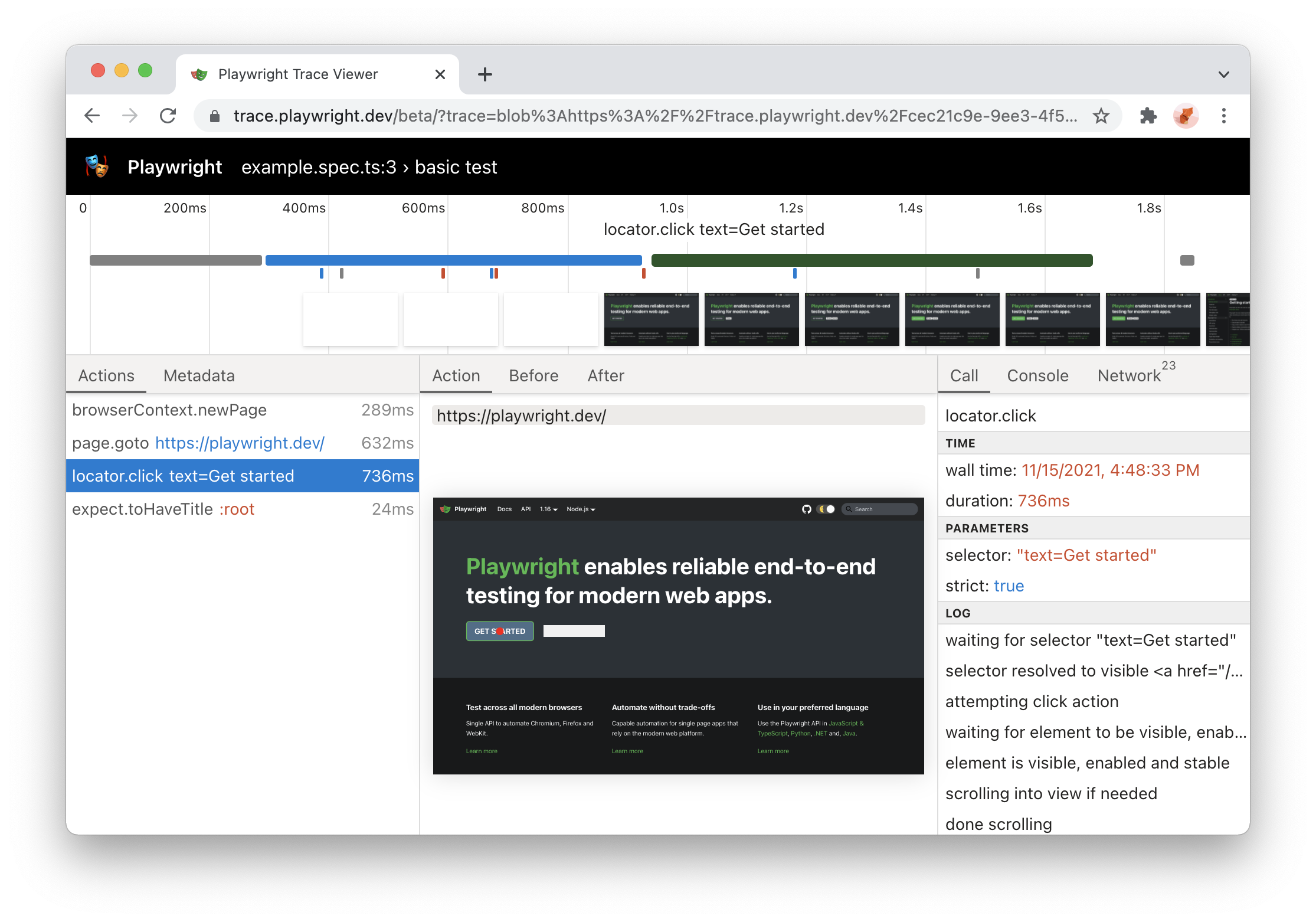
Playwright Trace Viewer 现在可以在 https://trace.playwright.dev 在线使用!只需将你的 trace.zip 文件拖放到页面上即可查看其内容。
🌐 Playwright Trace Viewer is now available online at https://trace.playwright.dev! Just drag-and-drop your trace.zip file to inspect its contents.
注意:跟踪文件不会被上传到任何地方;trace.playwright.dev 是一个渐进式网络应用,在本地处理跟踪。
- Playwright 测试跟踪现在默认包括源(可以使用跟踪选项关闭这些源)
- 跟踪查看器现在显示测试名称
- 包含浏览器详细信息的新跟踪元数据选项卡
- 快照现在有 URL 栏
HTML 报告更新
🌐 HTML Report Update
- HTML 报告现在支持动态过滤
- 报告现在是一个单一的静态 HTML 文件,可以通过电子邮件发送或作为 Slack 附件发送。

Ubuntu ARM64 支持及更多
🌐 Ubuntu ARM64 support + more
-
Playwright 现在支持 Ubuntu 20.04 ARM64。你现在可以在 Apple M1 和树莓派上通过 Docker 运行 Playwright 测试。
-
你现在可以使用 Playwright 在 Linux 上安装稳定版本的 Edge:
npx playwright install msedge
新 API
🌐 New APIs
1.16 版本
🌐 Version 1.16
🎭 Playwright库
🌐 🎭 Playwright Library
locator.wait_for
等待定位符解析为具有特定状态的单一元素。默认为“state: 'visible'”。
🌐 Wait for a locator to resolve to a single element with a given state. Defaults to the state: 'visible'.
使用列表时特别方便:
🌐 Comes especially handy when working with lists:
order_sent = page.locator("#order-sent")
order_sent.wait_for()
阅读更多关于 locator.wait_for() 的内容。
🌐 Read more about locator.wait_for().
Docker 对 Arm64 的支持
🌐 Docker support for Arm64
Playwright Docker 镜像现已发布适用于 Arm64 的版本,因此可以在 Apple Silicon 上使用。
🌐 Playwright Docker image is now published for Arm64 so it can be used on Apple Silicon.
查看更多关于 Docker 集成 的信息。
🌐 Read more about Docker integration.
🎭 Playwright追踪器
🌐 🎭 Playwright Trace Viewer
- 使用
npx playwright show-trace运行跟踪查看器,并将跟踪文件拖到跟踪查看器 PWA 中 - 更好地对行动目标进行视觉归因
查看更多关于 Trace Viewer 的信息。
🌐 Read more about Trace Viewer.
浏览器版本
🌐 Browser Versions
- Chromium 97.0.4666.0
- 火狐浏览器 93.0
- 网络工具包 15.4
此版本的 Playwright 还针对以下稳定通道进行了测试:
🌐 This version of Playwright was also tested against the following stable channels:
- 谷歌浏览器 94
- 微软 Edge 94
1.15 版本
🌐 Version 1.15
🖱️ 鼠标滚轮
🌐 🖱️ Mouse Wheel
通过使用 mouse.wheel(),你现在可以进行垂直或水平滚动。
🌐 By using mouse.wheel() you are now able to scroll vertically or horizontally.
📜 新的 Headers API
🌐 📜 New Headers API
以前无法获取响应的多个头部值。现在可以实现,并且提供了额外的辅助函数:
🌐 Previously it was not possible to get multiple header values of a response. This is now possible and additional helper functions are available:
- request.all_headers()
- request.headers_array()
- request.header_value()
- response.all_headers()
- response.headers_array()
- response.header_value()
- response.header_values()
🌈 强制颜色模拟
🌐 🌈 Forced-Colors emulation
现在可以通过在 browser.new_context() 中传入 forced-colors CSS 媒体特性或调用 page.emulate_media() 来模拟它。
🌐 Its now possible to emulate the forced-colors CSS media feature by passing it in the browser.new_context() or calling page.emulate_media().
新 API
🌐 New APIs
- page.route() 接受新的
times选项,用于指定此路由应匹配的次数。 - page.set_checked() 和 locator.set_checked() 被引入用于设置复选框的选中状态。
- request.sizes() 返回给定 HTTP 请求的资源大小信息。
- tracing.start_chunk() - 开始一个新的追踪区块。
- tracing.stop_chunk() - 停止新的追踪区块。
浏览器版本
🌐 Browser Versions
- Chromium 96.0.4641.0
- 火狐浏览器 92.0
- 网络工具包 15.0
1.14 版本
🌐 Version 1.14
⚡️ 新的“严格”模式
🌐 ⚡️ New "strict" mode
选择器歧义是自动化测试中常见的问题。“严格”模式确保你的选择器指向单个元素,否则会抛出异常。
🌐 Selector ambiguity is a common problem in automation testing. "strict" mode ensures that your selector points to a single element and throws otherwise.
在调用操作时传入 strict=true 以选择加入。
🌐 Pass strict=true into your action calls to opt in.
# This will throw if you have more than one button!
page.click("button", strict=True)
📍 新 定位器 API
🌐 📍 New Locators API
定位器表示页面上元素的视图。它包含足够的逻辑来在任何给定时刻获取该元素。
🌐 Locator represents a view to the element(s) on the page. It captures the logic sufficient to retrieve the element at any given moment.
Locator 和 ElementHandle 的区别在于,后者指向特定的元素,而 Locator 捕捉的是如何获取该元素的逻辑。
🌐 The difference between the Locator and ElementHandle is that the latter points to a particular element, while Locator captures the logic of how to retrieve that element.
另外,定位器默认是**“严格”**的!
🌐 Also, locators are "strict" by default!
locator = page.locator("button")
locator.click()
在文档中了解更多信息。
🌐 Learn more in the documentation.
🧩 实验性 React 和 Vue 选择器引擎
🌐 🧩 Experimental React and Vue selector engines
React 和 Vue 选择器允许通过组件名称和/或属性值来选择元素。其语法与属性选择器非常相似,并且支持所有属性选择器操作符。
🌐 React and Vue selectors allow selecting elements by its component name and/or property values. The syntax is very similar to attribute selectors and supports all attribute selector operators.
page.locator("_react=SubmitButton[enabled=true]").click()
page.locator("_vue=submit-button[enabled=true]").click()
在React 选择器文档和Vue 选择器文档中了解更多信息。
🌐 Learn more in the react selectors documentation and the vue selectors documentation.
✨ 新的 nth 和 visible 选择器引擎
🌐 ✨ New nth and visible selector engines
# select the first button among all buttons
button.click("button >> nth=0")
# or if you are using locators, you can use first, nth() and last
page.locator("button").first.click()

# click a visible button
button.click("button >> visible=true")
浏览器版本
🌐 Browser Versions
- Chromium 94.0.4595.0
- 火狐浏览器 91.0
- 网络工具包 15.0
1.13 版本
🌐 Version 1.13
Playwright
- 🖖 通过 page.drag_and_drop() API 提供的可编程拖放支持。
- 🔎 增强型 HAR,包含请求和响应的体积信息。可通过在 browser.new_context() 中使用
recordHar选项来使用。
工具
🌐 Tools
- Playwright跟踪查看器现在显示参数、返回值和
console.log()调用。
新的和大修的指南
🌐 New and Overhauled Guides
浏览器版本
🌐 Browser Versions
- Chromium 93.0.4576.0
- 火狐浏览器 90.0
- 网络工具包 14.2
新 Playwright API
🌐 New Playwright APIs
- browser.new_context() 和 browser.new_page() 中的新
baseURL选项 - response.security_details() and response.server_addr()
- page.drag_and_drop() and frame.drag_and_drop()
- download.cancel()
- page.input_value(), frame.input_value() and element_handle.input_value()
- page.fill()、frame.fill() 和 element_handle.fill() 中的新
force选项 - page.select_option()、frame.select_option() 和 element_handle.select_option() 中的新
force选项
1.12 版本
🌐 Version 1.12
🧟♂️ 推出 Playwright 跟踪查看器
🌐 🧟♂️ Introducing Playwright Trace Viewer
Playwright Trace Viewer 是一个新的图形界面工具,可帮助在脚本运行后探索已记录的 Playwright 跟踪。Playwright 跟踪让你可以检查:
- 每个 Playwright 操作之前和之后的页面 DOM
- 每个 Playwright 操作之前和之后的页面渲染
- 脚本执行期间的浏览器网络
使用新的 browser_context.tracing API 记录跟踪:
🌐 Traces are recorded using the new browser_context.tracing API:
browser = chromium.launch()
context = browser.new_context()

# Start tracing before creating / navigating a page.
context.tracing.start(screenshots=True, snapshots=True)

page.goto("https://playwright.nodejs.cn")

# Stop tracing and export it into a zip archive.
context.tracing.stop(path = "trace.zip")
稍后使用 Playwright CLI 检查痕迹:
🌐 Traces are examined later with the Playwright CLI:
playwright show-trace trace.zip
这将打开以下 GUI:
🌐 That will open the following GUI:

👉 在 追踪查看器文档 中阅读更多内容。
浏览器版本
🌐 Browser Versions
- Chromium 93.0.4530.0
- 火狐浏览器 89.0
- 网络工具包 14.2
此版本的 Playwright 还针对以下稳定通道进行了测试:
🌐 This version of Playwright was also tested against the following stable channels:
- 谷歌浏览器 91
- 微软 Edge 91
新 API
🌐 New APIs
reducedMotion选项在 page.emulate_media()、browser_type.launch_persistent_context()、browser.new_context() 和 browser.new_page() 中- browser_context.on("request")
- browser_context.on("requestfailed")
- browser_context.on("requestfinished")
- browser_context.on("response")
- browser_type.launch() 和 browser_type.launch_persistent_context() 中的
tracesDir选项 - 新的 browser_context.tracing API 命名空间
- 新的 download.page 方法
1.11 版本
🌐 Version 1.11
🎥 新视频:Playwright:面向现代网页的新测试自动化框架 (幻灯片)
- 我们谈论了 Playwright
- 展示了幕后的工程工作
- 展示了带有新功能的实时演示 ✨
- 特别感谢 applitools 举办此次活动并邀请我们!
浏览器版本
🌐 Browser Versions
- Chromium 92.0.4498.0
- 火狐浏览器 89.0b6
- 网络工具包 14.2
新 API
🌐 New APIs
- 在 API 中的方法(如 page.expect_request() 等)中对 异步谓词 的支持
- 新的模拟设备:Galaxy S8、Galaxy S9+、Galaxy Tab S4、Pixel 3、Pixel 4
- 新方法:
- page.wait_for_url() 用于等待导航到 URL
- video.delete() 和 video.save_as() 来管理屏幕录制
- 新选项:
- browser.new_context() 方法中的
screen选项用于模拟window.screen尺寸 - page.check() 和 page.uncheck() 方法中的
position选项 trial选项可在 page.check()、page.uncheck()、page.click()、page.dblclick()、page.hover() 和 page.tap() 中进行干运行操作
- browser.new_context() 方法中的
1.10 版本
🌐 Version 1.10
- Java 版 Playwright v1.10 现已稳定!
- 使用 新渠道 API 在 Google Chrome 和 Microsoft Edge 稳定版通道上运行 Playwright。
- Chromium 在 Mac 和 Windows 上截屏非常快速。
打包的浏览器版本
🌐 Bundled Browser Versions
- Chromium 90.0.4430.0
- 火狐浏览器 87.0b10
- 网络工具包 14.2
此版本的 Playwright 还针对以下稳定通道进行了测试:
🌐 This version of Playwright was also tested against the following stable channels:
- 谷歌浏览器 89
- 微软 Edge 89
新 API
🌐 New APIs
- browser_type.launch() now accepts the new
'channel'option. Read more in our documentation.
1.9 版本
🌐 Version 1.9
- Playwright Inspector 是一个用于编写和调试测试的新图形界面工具。
- 逐行调试你的 Playwright 脚本,支持播放、暂停和逐步执行。
- 通过记录用户操作来编写新脚本。
- 通过悬停在元素上为你的脚本生成元素选择器。
- 设置
PWDEBUG=1环境变量以启动检查器
- 暂停脚本执行 使用 page.pause() 在有界面模式下。暂停页面会启动 Playwright Inspector 进行调试。
- 新的 has-text 伪类 用于 CSS 选择器。
:has-text("example")匹配任何在其内部(可能在子元素或后代元素中)包含"example"的元素。查看 更多示例。 - 页面对话框现在在执行期间会自动关闭,除非配置了
dialog事件的监听器。了解更多。 - Python 的 Playwright 现已稳定,提供符合习惯的蛇形命名 API,并提供预构建的 Docker 镜像 用于在 CI/CD 中运行测试。
浏览器版本
🌐 Browser Versions
- Chromium 90.0.4421.0
- 火狐浏览器 86.0b10
- 网络工具包 14.1
新 API
🌐 New APIs
1.8 版本
🌐 Version 1.8
-
使用
:left-of()、:right-of()、:above()和:below()基于布局选择元素。 -
Playwright 现在包含命令行接口,即以前的 playwright-cli。
playwright --help -
page.select_option() 现在会等待选项出现。
-
用于断言元素状态的新方法,例如page.is_editable()。
新 API
🌐 New APIs
- element_handle.is_checked().
- element_handle.is_disabled().
- element_handle.is_editable().
- element_handle.is_enabled().
- element_handle.is_hidden().
- element_handle.is_visible().
- page.is_checked().
- page.is_disabled().
- page.is_editable().
- page.is_enabled().
- page.is_hidden().
- page.is_visible().
- element_handle.wait_for_element_state() 中的新选项
'editable'。
浏览器版本
🌐 Browser Versions
- Chromium 90.0.4392.0
- 火狐浏览器 85.0b5
- 网络工具包 14.1
1.7 版本
🌐 Version 1.7
- 新的 Java SDK:Playwright for Java 现在与 JavaScript、Python 和 .NET 绑定 相当。
- 浏览器存储 API:新的便捷 API,用于保存和加载浏览器存储状态(Cookie、本地存储),以简化带有身份验证的自动化场景。
- 新的 CSS 选择器:我们收到了你对更灵活选择器的反馈,因此重新设计了选择器的实现。Playwright 1.7 引入了新的 CSS 扩展,并且未来还会有更多更新。
- 新网站:位于 playwright.dev 的文档网站已更新,现在使用 Docusaurus 构建。
- 支持 Apple Silicon:WebKit 和 Chromium 的 Playwright 浏览器二进制文件现在已为 Apple Silicon 构建。
新 API
🌐 New APIs
- browser_context.storage_state() 用于获取当前状态以便以后重用。
- 在 browser.new_context() 和 browser.new_page() 中使用
storageState选项来设置浏览器上下文状态。
浏览器版本
🌐 Browser Versions
- Chromium 89.0.4344.0
- 火狐浏览器 84.0b9
- 网络工具包 14.1